
Cloud Watcher
Cloud Watcher
Cloud Watcher is an important feature integrated into TOFFS’ CDN, enabling accurate and automated monitoring of the CDN system’s performance. It serves as a tool to ensure that the website operates smoothly and provides the best user experience.
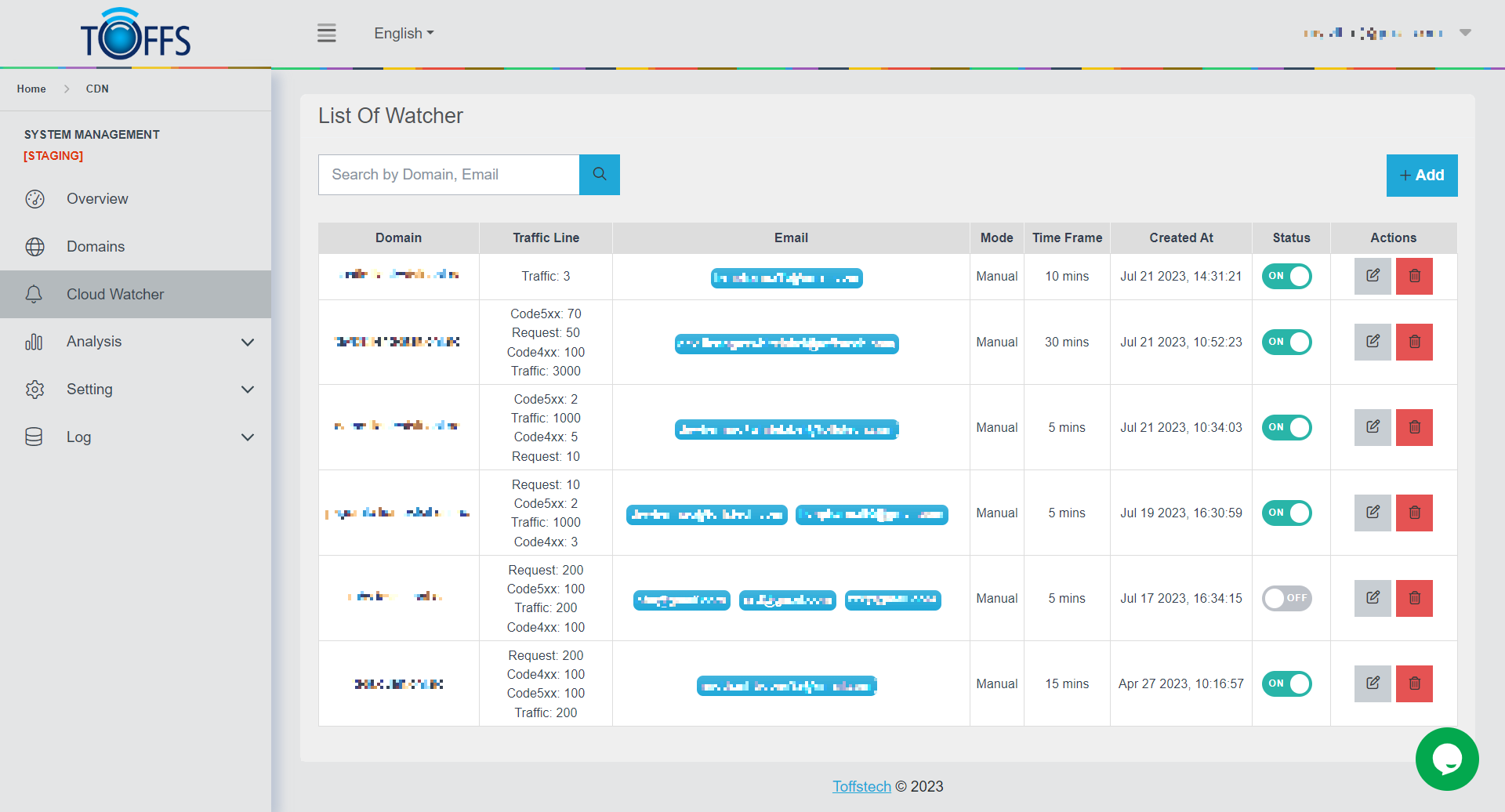 Figure 141
The key features of Cloud Watcher include:
-
Time Frame: Administrators can set specific time frames to monitor the CDN’s performance. For example, they can choose to track performance for a 5 to 30 minutes.
-
Traffic Check: Cloud Watcher automatically checks the traffic passing through the CDN during the specified time frame. This helps identify peak loads and high-traffic periods, allowing for content distribution optimization.
-
Request Monitoring: Cloud Watcher tracks the number of requests sent to TOFFS’ CDN servers. This helps determine the level of service and ensures that the system can handle an adequate number of requests within a specific time frame.
-
HTTP 4xx and 5xx Status Check: Cloud Watcher continuously monitors HTTP 4xx (client-side errors) and 5xx (server-side errors) status codes from the CDN system. If the number of errors exceeds a predefined threshold, the system promptly notifies administrators, enabling them to address the issues promptly.
-
Email Notifications: When Cloud Watcher detects any issues surpassing predefined thresholds (e.g., excessive traffic, sudden increase in errors), it sends alert notifications to the preconfigured email address of the administrator. This ensures that any incidents are promptly handled, preventing any negative impact on user experience and website performance.
The Cloud Watcher feature within TOFFS’ CDN is a crucial tool for monitoring and maintaining the CDN system’s performance automatically and effectively. It provides administrators with an overview of the CDN’s operations, allowing them to take timely actions as needed to maintain stability and optimal performance for the TOFFS website.
To add a Cloud Watcher for a website, follow these steps:
Step 1: Access the Cloud Watcher page.
Step 2: Click the “+Add” button to create a new Cloud Watcher.
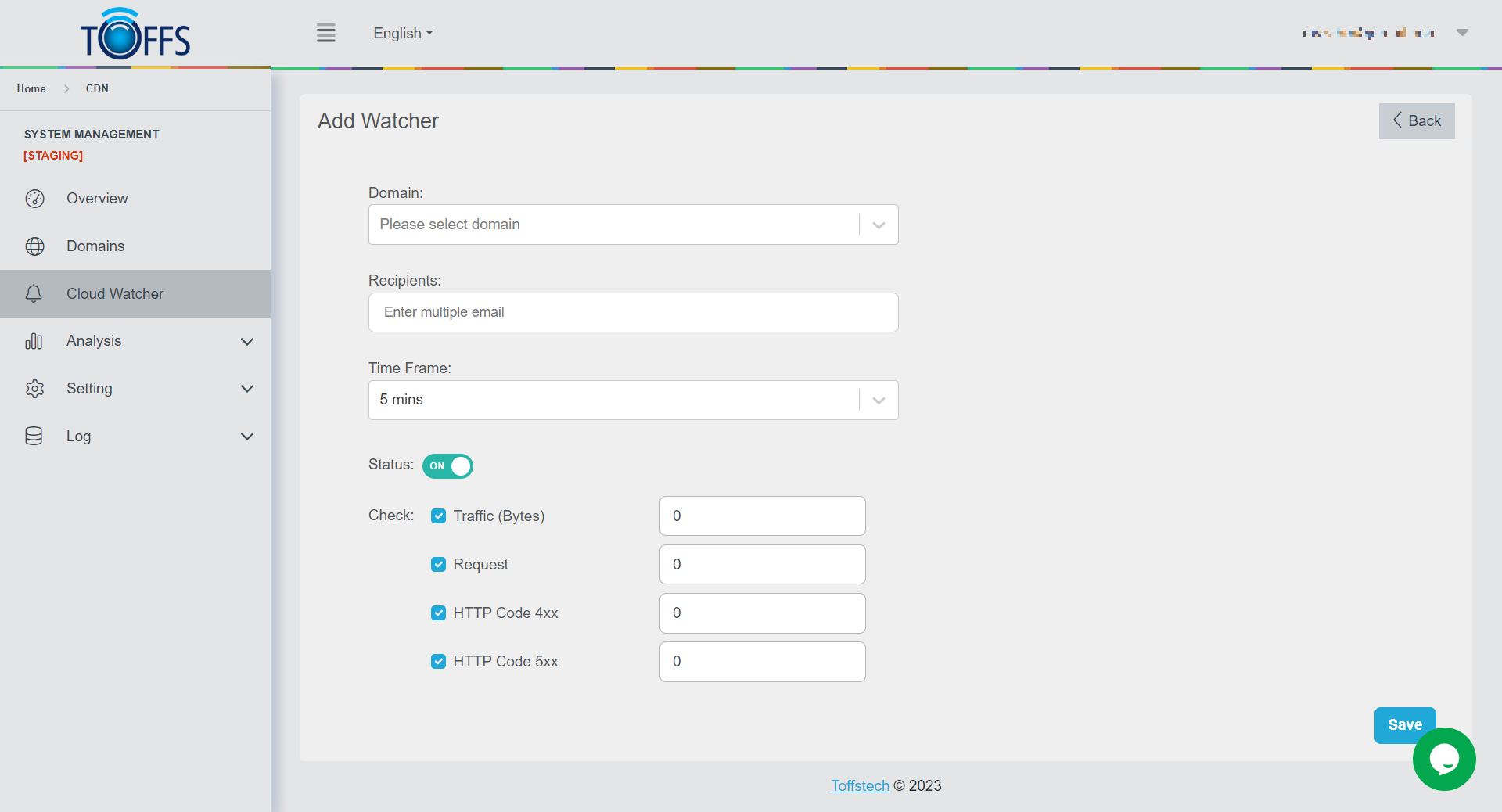 Figure 142
Step 3: In Domain field, enter the domain of the website you want to monitor, for example: www.example.com.
Step 4: In Recipients field, enter the list of recipients you want to receive alert notifications in case of incidents. The email address of the administrators is typically provided here.
Step 5: Set the Time Frame for monitoring the CDN’s performance. You can choose intervals such as 5 minutes, 10 minutes, 15 minutes, or 30 minutes based on your requirements.
Step 6: In Status filed, enable or disable the Cloud Watcher feature according to your preference. If enabled, it will perform checks based on the configured settings.
Step 7: Configure the types of checks:
-
Traffic (bytes): Set up Cloud Watcher to automatically check the traffic passing through the CDN within the specified time frame.
-
Request: Configure Cloud Watcher to monitor the number of requests sent to the CDN server within a specific time frame.
-
HTTP Code 4xx: Cloud Watcher will monitor HTTP status code 4xx, representing client-side errors.
-
HTTP Code 5xx: Cloud Watcher will monitor HTTP status code 5xx, representing server-side errors.
Step 8: Save the configuration and start monitoring: Once you have entered all the required information and set up the checks, save your Cloud Watcher configuration.
The system will start monitoring the CDN’s performance based on your configured settings. If any issues or thresholds are exceeded, Cloud Watcher will automatically send alert notifications to the administrators’ email addresses.
Please contact Toffs Security Operation Center for assistance if you encounter any issues.