
Add Header
Add Header
You can easily add additional HTTP headers or modify existing ones that the agent sends when running a test. Please note that these request settings are only applicable to Web and Transactions test types.

Figure 270
Follow the steps below for each Request Header you wish to add:
Step 1: Click the “+Add Header” button.
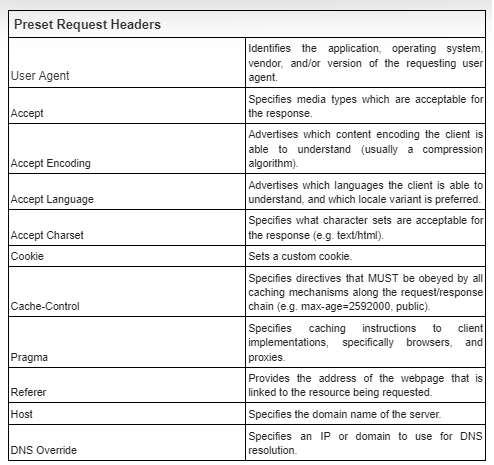
Step 2: In the “Field” drop-down menu, you have two options:
- Choose from a list of common header field names to configure (see the description of each option below).
- Select “Custom” if you want to define your own header field. If you choose “Custom”, remember to input the name of your Custom field.
Step 3 (Optional): You can provide a “Host” value for the header.
Step 4: In the “Value” input box, enter the data you want to assign to this Header field.
Step 5: If you want to add another additional Header, simply click the ”+” button and repeat Steps 2 to 4.
Note:
- When you provide a “Host” for the Field in Header, it means the header will be added for requests that have this specific Host.
- When you do not provide a “Host,” it means the header will be added for all requests.
- With DNS Override, the “Host” is required.
By following these steps, you can easily customize the HTTP headers to suit your testing needs using Toffs.
Please contact Toffs Security Operation Center for assistance if you encounter any issues.